Player Shop lets your character sell items both while you are online in Shop Mode and while you are offline. After Start Shop, the seller remains in the game as an active shop. You may stay online or use Idle Shop to exit the client while the shop continues operating on the map.

Using one Private Shop Document consumes the document and activates a 48-hour Player Shop licence on the character that uses it.
Using another document before the licence expires adds another 48 hours to the remaining licence time.
The document itself is not bound to the player who bought it from the Store. It may be traded, given to another player or even listed for sale in a Player Shop. Only using the document activates the licence.
This is the seller window used to prepare offers for the Player Shop. Here you choose the shop title, add items, set the unit price, adjust the amount for stackable items and use seller tools such as Save Price, History, Start Shop and Close.
Attribute items keep their rarity and attribute preview. The seller can review the selected item on the right side before activating the shop.
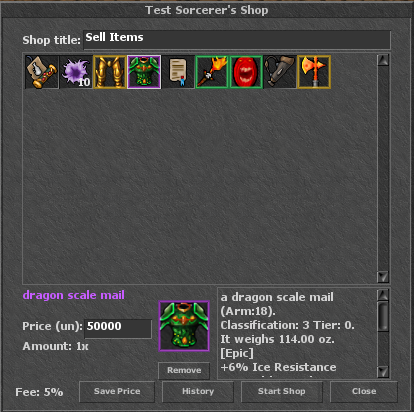
Start Shop activates the offers without logging the seller out. The character stays visible in the game and other players may open the shop and buy from it immediately.
While Shop Mode is active, the seller cannot walk normally and shop-incompatible combat/trade interactions are blocked.
Stop Shop closes the Player Shop, restores normal movement and returns unsold offers to the seller; items that do not fit are moved safely to Inbox.
Idle Shop exits the entire OTC client but does not stop the Player Shop. An offline shop NPC continues selling the remaining offers.
The selling character may log in again while its shop is active. After relog, the character returns to Shop Mode and the current unsold offers are restored in the shop window. Relogging does not close the shop. Use Stop Shop when you actually want to end it.
Save Price remembers the current unit price as the default for that item, making repeated listings much faster.
Attribute-item rarity is respected when remembering prices. Regular backpacks and containers are not saved as default-price templates; quivers can use Save Price.
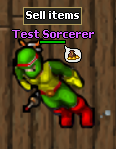
Active Player Shops are visually marked in the game world. The seller is shown with the configured shop title and a visible shop indicator above the character, making it easy for other players to recognize a live Player Shop on the map.
This visual marker is used both as a clear seller indicator and as part of the Player Shop identity in the world.
The History button lets the seller review completed Player Shop sales.
If an item is sold while the owner is online in Shop Mode, the sold offer disappears from the owner's active shop window immediately.
Active Player Shops are visually marked with the shop name/title and seller indicator; active sellers are also highlighted in the VIP list.
Only one Player Shop may be active on an account at the same time, regardless of how many characters the account contains.
A second character on the same account cannot create another Player Shop while the first one is active.
Other characters from the same account cannot enter normal gameplay while an active Player Shop exists.
The selling character itself may log back in. It resumes the existing Player Shop in Shop Mode with its current remaining offers; relogging does not stop the shop.
| Rule | Player Shop behaviour |
|---|---|
| Offer limit | Maximum 48 top-level offers per Player Shop. |
| Backpacks | A backpack or other container sold together with its contents counts as one offer, regardless of the number of items inside it. |
| Container safety limit | One container offer may contain up to 100 internal items, with nesting up to 4 levels. Internal items do not consume additional slots from the 48-offer shop limit. |
| Price | The minimum unit price is 10 gp. |
| Attribute items | Item attributes and rarity information are preserved and shown in the shop preview. |
| Refiner's Tool | The Refiner's Tool (Item ID 47372) is assigned to the character and cannot be added to or sold through a Player Shop. |
| Private Shop Document | The document is tradable and may itself be listed in a Player Shop before it is used. |
| Coins | Gold Coins, Platinum Coins and Crystal Coins cannot be listed as sale items. |
| Charges | Items with charges must have their full original charges. |
| Timed items | Used or active timed items cannot be sold; timed items must be in their original unused state. |
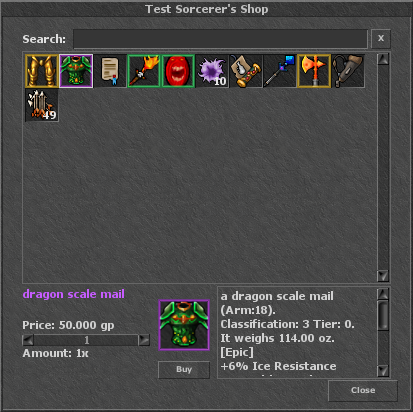
This is the buyer window used when opening another player's shop. The buyer can search the offers, select an item, review the full preview on the right, set the amount for stackable offers and confirm the purchase with the Buy button.
The same buying interface is available whether the seller is online in Shop Mode or selling offline through the Player Shop NPC.
The Player Shop remains available while the licence is valid. The owner may stay online in Shop Mode or use Idle Shop and leave the offline shop NPC in the game.
Active, unexpired shops are restored automatically after a server restart. If the owner returns after Idle Shop, the current remaining offers are restored and the character continues in Shop Mode.
The Player Shop no longer blocks login after its licence expires.
When the owner character logs in after expiry, unsold items are returned to the character's backpack.